9" Car Stereo for Hyundai Santa Fe 2 2006-2012 | CarPlay Android Auto Mirror Link GPS AM/FM Bluetooth9" HD · Wince · CarPlay & Android Auto via Dongle · AM/FM✓Ships from USA✓30-Day Returns✓2-Year Warranty✓VIN Fitment CheckDescriptionHyundai Santa Fe 2Compatible Vehicles: For Hyundai Santa Fe 2 (2006–2012)✓Not sure it fits? Message us with your VIN (17-digit vehicle ID) before purchase — we'll confirm compatibility within 24 hours (US business hours). No guesswork, no wrong orders.⚠ Important — Factory Amplifier Notice
Please verify whether your vehicle is equipped with a factory amplified or premium sound system (e.g. Infinity, JBL, or similar). If so, additional accessories may be required. Message us before purchase — we will confirm the correct harness and reply within 24 hours.
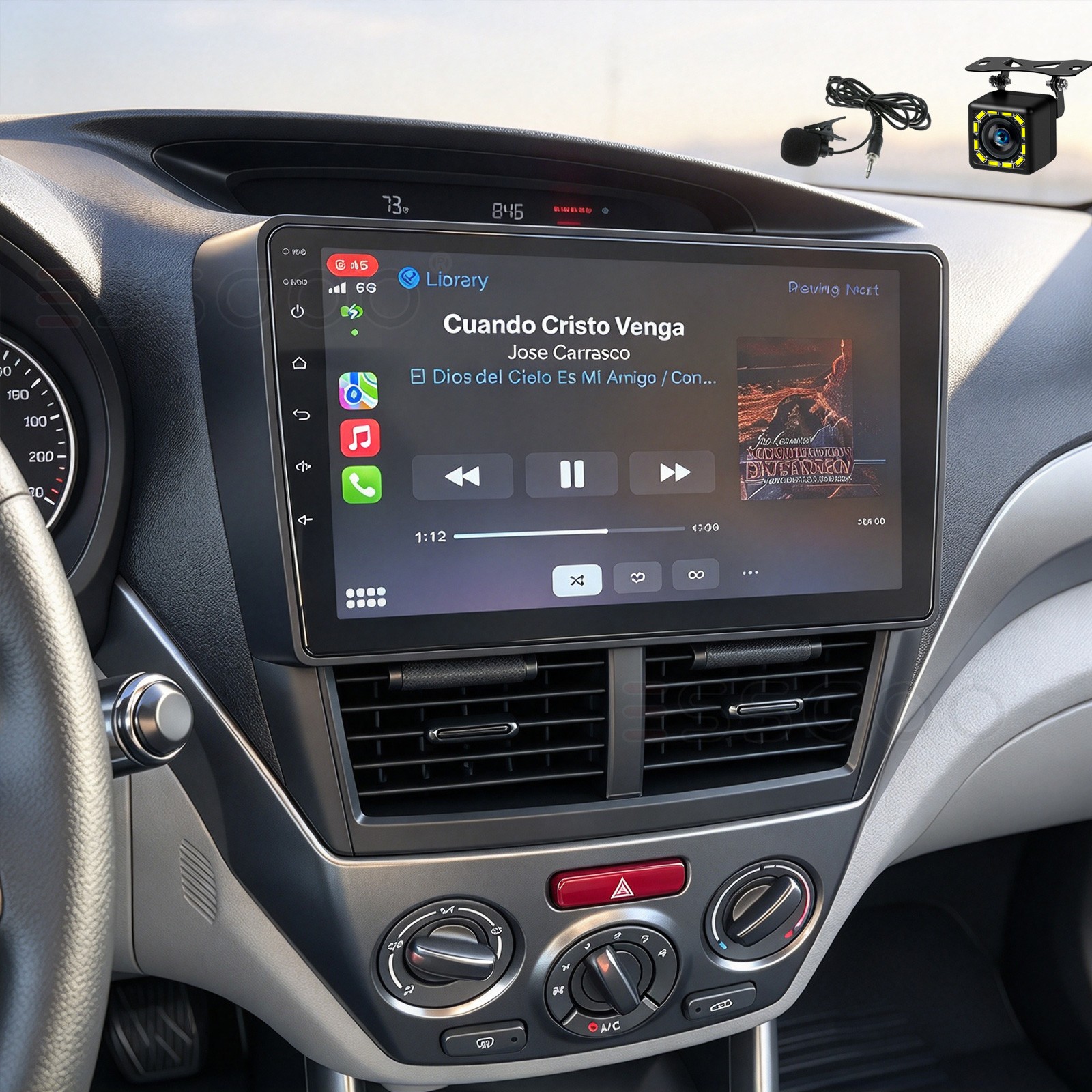
🚙Upgrade Your Hyundai Santa Fe 2's Aging Factory Radio. If your 2006–2012 Santa Fe still has the basic factory head unit, this 9" stereo adds CarPlay & Android Auto (via dongle), GPS navigation, Bluetooth hands-free, and a backup camera — without losing your steering wheel controls.● CarPlay & Android Auto (via USB Dongle)
Connect your iPhone for CarPlay or Android phone for Android Auto using an optional USB dongle (sold separately) — safely access calls, texts, navigation, and music via touchscreen or voice control. Also supports Mirror Link natively for iOS and Android screen mirroring.
● 9" 1280×720 HD Touchscreen
9-inch 1280 × 720 HD capacitive touchscreen with wide viewing angle. Dedicated fit for Hyundai Santa Fe 2 (2006–2012) — plug and play, no extra frame or cable changes required. 2.5D curved glass for a premium look.
● GPS Navigation Ready
Built-in GPS module supports offline navigation maps — no need for a phone signal. Independent antenna ensures strong, stable signal. Note: navigation maps sold separately.
● AM/FM Radio & Bluetooth 5.0
AM/FM radio with RDS — save up to 18 presets. Bluetooth 5.0 with built-in mic for hands-free calls, phonebook access, and music playback — faster pairing, lower latency, more stable connection. Built-in ASP chip with 32-band EQ, 4×45W amplifier, surround sound, and subwoofer output.
● Backup Camera & Steering Wheel Control
Supports rear-view camera input. Auto-switches to rear view when reversing — park safely. Retains original steering wheel controls for volume, track, and call.
● Plug & Play Installation
Comes with a dedicated radio frame and wiring harness for the Santa Fe 2 — no cutting or splicing required. Includes WiFi antenna, USB cables, and reverse line 1280 × 720 HD capacitive touchscreen, wide viewing angleGPSBuilt-in GPS module (offline maps sold separately)Radio BandFM 87.5–108 MHz · AMRDSRT, AF, TA — FM channel information (US/EU)AmplifierMOSFET output: 4 × 45 watts maxBluetooth5.0 — hands-free calls, phonebook, musicCarPlay / Android Autovia optional USB dongle (not included)Mirror LinkSupported (iOS & Android)Audio FormatsMP3, FLAC, APE, WMA, WAV, AAC, AMRVideo FormatsAVI, ASF, MP4, MOV, MPG, MPEG1/2/4, VOB, MKV, FLV, TS, WMV, RMVB, 3GPOSD LanguagesEnglish, German, French, Italian, Spanish, Portuguese, Russian, Turkish, PolishWorking VoltageDC 12VPackage Includes
- 1 × Car Radio
- 1 × Radio Frame
- 1 × GPS Antenna
- 1 × WiFi Antenna
- 2 × USB Cables
- 2 × Power Cables
- 1 × Reverse Line & Antenna Adapter
1 × Instruction Manual
- 1 x 12CAM Rear View Camera
Troubleshooting FAQWhy won't my car radio turn on?1.1 Check the voltage — the radio requires 12V DC.
1.2 When testing, combine the red wire and yellow wire to the positive pole of the power supply, and the black wire to the negative pole.
1.3 Replace the same type of fuse and re-test.
Note: Always use our power cord to connect to our car radio — do not plug the original car plug directly into our machine.Why does the display show "No Signal" when reversing?Check whether the camera cable is properly connected to the car radio.
Note: The video port of the rear camera must be plugged into the "CAMIN" port of the car radio.Why can't I find FM stations?4.1 The radio antenna is not inserted.
4.2 Check whether the radio antenna is plugged in — plug in the antenna several times to ensure good contact.
4.3 Signal at your location is weak. Move to a better location and re-test.
4.4 The car's radio antenna is broken or has no effect — replace the antenna and re-test.Why can't I connect to the car radio's Bluetooth?5.1 Open your phone's Bluetooth settings, turn on Bluetooth, search for devices, and find the player's Bluetooth model to pair. If a pairing code is required, try 0000 first, then 1234 or 123456.
5.2 Try another mobile phone to test this function.
5.3 If all methods are correct and Bluetooth still doesn't work, unplug the plug on the back of the player and plug it back in after 3 minutes.Product GalleryActual PhotosWarranty & ShippingUS Policy30-Day No-Questions Returns & 2-Year Warranty
Not the right fit? Return within 30 days for a refund or replacement (resalable condition with all accessories). Items with quality issues within 2 years can be returned for repair.
Shipping & Support (US)
Ships from our US warehouse. Free shipping within the contiguous 48 states. Orders ship within 1 business day. Delivery in 3–7 business days with tracking. AK/HI/PR & international: message us for a quote.